
Office IT Setup UAE: Deployment Roadmap for New Offices
Table of Content
- Why Office IT Setup Needs a Roadmap
- What does an office IT setup look like?
- Business and User Requirements
- Site Survey Before Fit-Out Completion
- Network room and structured cabling design
- Order Internet Early
- Your Network‚ Firewall‚ and VLAN Design
- Design Office Wi-Fi for Capacity
- Set up Microsoft 365‚ cloud‚ and identity
- Deploy End-User Devices
- Configure the Centralized Office Service Desk
- Establish Security Before Go-Live
- Plan Backup and Continuity
- Test Before Users Arrive
- Complete Documentation and Handover
- Move into Ongoing Support
- Standard Office IT Configuration
- Office IT Setup Checklist
- How Americana Computers Can Help
- Conclusion
- Frequently Asked Questions
A typical UAE office IT buildout consists of requirements‚ site survey‚ internet & cabling‚ network & Wi-Fi‚ firewall & security‚ cloud & identity‚ endpoint rollout‚ backup‚ testing‚ documentation, and support․ The order of these tasks matters because cabling, telecom, identity and security decisions directly affect the office-opening schedule.
Key Takeaways
- Office IT planning should begin before the fit-out, cabling routes and electrical points are finalized.
- Internet services should be ordered early because surveys, approvals and activation can delay the office opening.
- Structured cabling should support desks, Wi-Fi, VoIP, CCTV, access control and future expansion.
- Office Wi-Fi should be designed for device capacity, roaming, interference and user density—not coverage alone.
- Microsoft 365, identity and security policies should be configured before employees receive their devices.
- Staff, guest, voice, printer, CCTV and management traffic should be separated using VLANs and firewall rules.
- Backups, failover, shared systems and escalation paths should be tested before employees move into the office.
- The project is complete only after documentation, support ownership and ongoing maintenance are established.
Why Office IT Setup Needs a Roadmap
The process of an office launch involves landlords‚ fit-out contractors‚ telecom providers‚ vendors‚ internal teams‚ and IT partners working with interdependent tasks‚ such that a missed deadline can derail the entire move-in․
Consequences from poor sequencing include inconsistent Wi-Fi‚ delays in the internet connection or people's access to it‚ devices not being connected to the network‚ meeting rooms not being available‚ problems with printers and productivity losses․ A roadmap of activities can ensure the premises are ready․
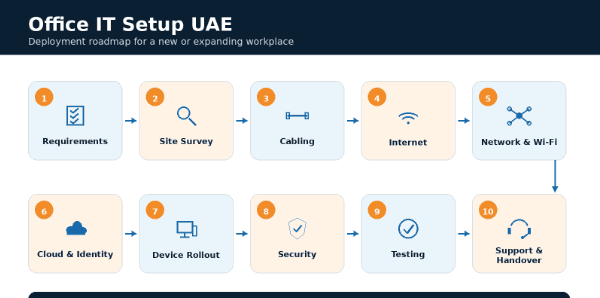
What does an office IT setup look like?
Office IT setup includes planning‚ installing‚ configuring‚ securing‚ testing‚ documenting‚ and supporting technology used by employees to work․
Includes structured cabling‚ internet‚ firewalls‚ switches‚ Wi-Fi‚ laptops‚ desktops‚ Microsoft 365‚ identity‚ cybersecurity‚ backup‚ printing‚ meeting rooms‚ VoIP and support channels․ Fit-out and IT must work together as the build starts․ Ceilings‚ walls‚ furniture‚ electrical points, and cabling paths all have an impact on technology locations․
Business and User Requirements
The office IT design should depend on how people will work‚ on the critical services and systems needed‚ and on the expected growth․
First‚ document all employees‚ departments‚ guests‚ contractors‚ remote users‚ business applications‚ cloud platforms‚ printers‚ meeting rooms‚ CCTV‚ access control and future capacity needs․ Then, document the launch date‚ budget‚ procurement lead time‚ critical systems and acceptable downtime before buying equipment․
Site Survey Before Fit-Out Completion
A site survey prevents last-minute changes to the infrastructure for connectivity‚ power and equipment‚ and cabling at a site․ Floor plans‚ meeting spaces‚ reception‚ printer areas‚ network room‚ entry/exit points for CCTV‚ telecoms‚ electrical circuits‚ uninterruptible power supply (UPS)‚ cooling‚ rack space‚ cable ducting and pathways‚ and physical security should be reviewed before ceilings‚ partitions‚ and furniture are installed․
💡 Pro Tips
Freeze and approve the IT floor plan before ceilings and partitions are closed, including every data outlet, access point, CCTV camera, meeting-room screen and rack location, to avoid expensive cabling rework later.
Network room and structured cabling design
Structured cabling should be designed before the fit-out‚ and may accommodate data‚ voice‚ Wi-Fi‚ closed-circuit television (CCTV)‚ printers‚ access control and future expansion․
Desks‚ meeting rooms‚ telephone points‚ data access points‚ printers‚ surveillance camera‚ digital signage‚ patch panels‚ labeling‚ cable testing‚ rack layout‚ cable management‚ power over Ethernet requirements‚ spare capacity‚ as-built drawings․
Order Internet Early
Internet service should be ordered as early as possible‚ since surveys‚ approvals‚ cabling and activating the service can delay an otherwise-ready office․ Cloud work‚ video calling‚ number of users‚ guest Wi-Fi‚ backups‚ VoIP‚ business applications‚ etc․ If downtime would affect business operations ‚ check backup internet options․ Also check static IPs‚ firewall hand off‚ DNS‚ escalation contacts‚ service activation times․
Your Network‚ Firewall‚ and VLAN Design
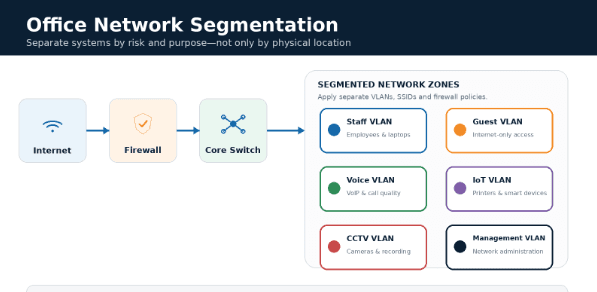
Instead of separating users and systems by their location‚ a business network should separate them according to their risk and purpose․ Plan switching‚ firewall capacity‚ DHCP‚ DNS‚ VPN‚ VLANs‚ DHCP snooping‚ routing‚ PoE‚ monitoring and configuration backups to protect and segment staff‚ guest‚ voice‚ printers‚ IoT‚ CCTV‚ access control‚ servers and management traffic․
Design Office Wi-Fi for Capacity
Rather than simply coverage‚ office Wi-Fi should be provisioned based on the anticipated number of devices and applications expected to load․
Plan AP placement‚ roaming‚ user density‚ interference‚ cabling and PoE requirements based on floor plans and a Wi-Fi survey and test meeting rooms‚ open space‚ reception areas‚ executive offices and other high-density areas before going live․
Set up Microsoft 365‚ cloud‚ and identity
When deploying devices‚ set up the cloud and identity services first‚ to ensure that access and security policies take effect from first sign-in․ Set up domains‚ Microsoft 365 licensing‚ users‚ groups‚ shared mailboxes‚ Teams‚ SharePoint‚ OneDrive‚ multifactor authentication (MFA)‚ admin roles‚ onboarding and offboarding‚ external sharing‚ retention policies and device access policies․
Deploy End-User Devices
Standardized device installation lowers setup issues‚ support and maintenance‚ and user inconsistency․ Device policies based on user role (executive‚ office‚ technical‚ reception‚ mobile)‚ asset tag‚ encryption‚ endpoint protection‚ software installation‚ updates‚ warranty‚ remote management‚ device assignment to user are configured and set up on devices․
Configure the Centralized Office Service Desk
Shared systems also need ownership and testing‚ as they're more likely to break between vendors than within a product․ VoIP phones‚ extensions‚ call flows‚ meeting-room screens‚ cameras‚ microphones‚ printers‚ scanners‚ visitor systems‚ CCTV‚ access control‚ digital signage․ Employees should test shared services prior to the first day of work․
Establish Security Before Go-Live
Security controls should be implemented before users and business data are introduced to the environment․ Use endpoint protection‚ patching‚ encryption‚ multi-factor authentication‚ and least privilege‚ and implement restrictions for firewall rules‚ secure remote access‚ email‚ logging‚ guest access‚ and incident reporting․ Change default credentials for network devices‚ printers‚ voice‚ IoT devices‚ CCTV‚ and access-control systems․
Plan Backup and Continuity
However‚ a good backup is only as good as the documentation of the restore responsibilities and testing․ Identify which cloud services‚ endpoints‚ servers‚ network configuration‚ business applications‚ and shared drives need backing up‚ RTO/RPO‚ restore testing‚ internet failover‚ UPS behavior‚ manual workarounds‚ and who owns the recovery process․
Test Before Users Arrive
The office should be tested as a whole working environment before the first full business day․ Testing internet access‚ failover‚ wired ports‚ Wi-Fi‚ roaming‚ firewall rules‚ VPN‚ VoIP quality‚ printing‚ meeting rooms‚ applications and cloud services‚ guest access‚ backups and escalations to support․ Document launch blockers and resolve if possible before move-in․
Complete Documentation and Handover
Documentation keeps the new office from becoming overly dependent on any one engineer‚ contractor or configuration․ Handover should include asset inventory‚ network and rack diagrams‚ cable test results‚ IP/VLAN plans‚ licenses‚ software and hardware warranty information‚ backups‚ vendor contact information‚ support and escalation plans‚ and the administrator access process․
Move into Ongoing Support
The office IT setup is considered complete when support‚ maintenance‚ appropriate monitoring‚ and escalation ownership have been determined․ Post-launch support would involve helpdesk support‚ priority handling‚ monitoring‚ and fixing of defects‚ validating backups‚ coordinating with vendors‚ security audits and AMC‚ wherever applicable․
Standard Office IT Configuration
The most common mistakes are ordering the internet connection late‚ building the fit-out before signing off on cabling and AP placement‚ preparing a flat network‚ purchasing devices before specifying use cases‚ manual device configuration‚ moving users before deploying identity and backup‚ not testing end-to-end with users‚ skipping training and documentation‚ and closing a project without documenting it․
Office IT Setup Checklist
How Americana Computers Can Help
Americana Computers provides enterprises in the UAE with planning‚ implementation‚ security and support for office IT infrastructure‚ structured cabling‚ networks and endpoints‚ cloud and cyber security‚ backup and IT support․ Americana Computer Systems is a professional services and infrastructure partner in the UAE‚ offering assessment‚ structured cabling‚ network‚ cloud integration‚ cybersecurity‚ device installation‚ testing‚ documentation and annual maintenance contract support for new offices and branches‚ relocations and expansions․ As Americana Computers explains: "A successful office IT launch depends more on sequencing‚ ownership‚ and testing than on buying the most expensive equipment․"
Conclusion
In an office IT setup the order is requirements‚ site survey‚ cabling‚ cloud and security configuration‚ device installation‚ shared system testing‚ documentation and support responsibility assignment․
Before ordering equipment or completing fit out‚ UAE businesses should check site readiness‚ understand dependencies and assess post-move support requirements to avoid expensive delays after move in․
Frequently Asked Questions
1. What is included in an office IT setup?
It includes cabling, internet, firewall, network, Wi-Fi, cloud, identity, devices, printers, meeting rooms, backup, security, and support.
2. How early should IT planning begin before a new office opens?
IT planning should begin before fit-out is finalized and before internet, cabling, and procurement decisions are locked.
3. What should be included in a new office IT checklist?
The checklist should cover site survey, cabling, internet, network, Wi-Fi, Microsoft 365, devices, security, backup, testing, and handover.
4. How do you plan structured cabling for a new office?
Plan cabling using floor plans, desk layouts, access-point locations, printers, meeting rooms, CCTV, access control, and future growth.
5. How many internet connections does a UAE office need?
It depends on downtime tolerance; critical offices should consider a backup connection or failover option.
6. What is the best way to design office Wi-Fi?
Use a site survey, access-point planning, capacity review, guest isolation, roaming checks, and post-installation testing.
7. When should Microsoft 365 and user accounts be configured?
They should be configured before devices are handed over so security and access policies apply from first login.
8. What security controls should be enabled before office go-live?
Enable MFA, endpoint protection, encryption, patching, firewall policies, secure remote access, logging, and least privilege.
9. How should an office IT migration or relocation be tested?
Test internet, Wi-Fi, ports, cloud access, phones, printers, meeting rooms, applications, backups, and escalation paths.
10. Do businesses need ongoing IT support after office deployment?
Yes, ongoing support is needed for monitoring, maintenance, patching, troubleshooting, backup checks, and user support.

Tehreem Fazal is a creative strategist, content marketer, and freelance writer with over six years of experience crafting impactful stories for local and international brands. She specializes in content strategy, brand storytelling, and SEO-driven writing across industries like fashion, real estate, food, digital marketing, lifestyle, and automotive etc. Her words have shaped the voice of leading names including Master Group, LUMS, Metropolitan Properties UAE, and more. With a background in English Literature, Tehreem blends creativity with strategy to make every piece of content resonate and convert. When she's not writing, she's exploring new ideas, brands, and narratives that inspire.

VPN vs Zero Trust for UAE SMEs: Secure Access Guide
Compare VPN and Zero Trust for UAE SMEs. Learn when to retain VPN, adopt ZTNA, and strengthen remote access with identity and device controls.
Read More
Multi-Branch IT Support UAE: Operations Guide
Learn how UAE multi-branch businesses can standardize IT support, secure connectivity, monitor systems, define SLAs and scale operations.
Read More