
Network Infrastructure Setup UAE: Switches, Firewall & Wi-Fi
Table of Content
- Why Network Components Must Be Planned Together
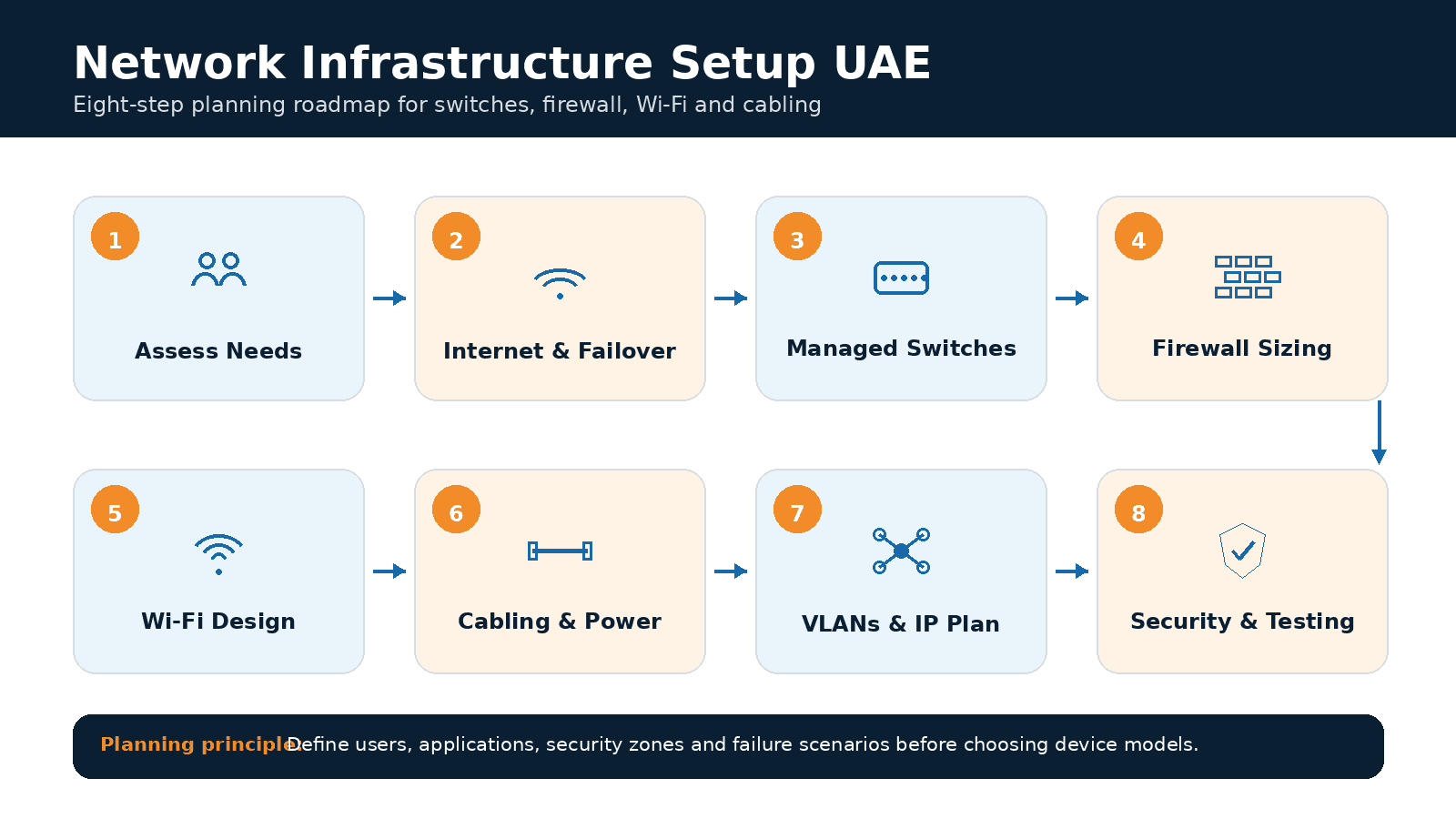
- What Goes Into Setting Up A Business Network?
- Step 1: Assess Users‚ Applications‚ Devices‚ And Uptime Needs
- Step 2: Design for Internet Connectivity and Resilience
- Step 3: Choose Managed Network Switches
- Step 4: Size And Configure The Firewall
- Step 5: Plan For Your Office's Wi-Fi Network
- Step 6: Build The Structured Cabling And Power Infrastructure
- Step 7: Configure the VLANs and IP Addresses
- Step 8: Apply A Security And Management Baseline
- Network Acceptance Testing Checklist
- Documentation and Handover Requirements
- Common Mistakes In Setting Up A Network Infrastructure
- How Americana Computers Can Help
- Conclusion
- Frequently Asked Questions
A UAE business network should be engineered as one connected system comprising internet connectivity, managed switches, firewalls, Wi-Fi, structured cabling, VLANs, IP services, monitoring, redundancy and documentation The right choice of equipment would depend on the user and application requirement‚ the density and security zone of the devices‚ the uptime needs, and future expansion․
Key Takeaways
- Plan internet, switches, firewalls, Wi-Fi, cabling and VLANs as one connected system.
- Define users, applications, devices and uptime requirements before selecting equipment.
- Size switches using port count, uplinks, PoE demand, management features and future growth.
- Size the firewall using inspected traffic, VPN use, security services and future bandwidth.
- Design Wi-Fi using a site survey, device density, interference and roaming requirements.
- Separate staff, guest, voice, servers, CCTV, IoT and management traffic where practical.
- Test failover, VLANs, firewall rules, Wi-Fi, PoE and business applications before handover.
- Deliver diagrams, switch-port maps, IP plans, firewall rules and configuration backups.
- Assign monitoring, maintenance and escalation ownership before declaring the network complete.
Why Network Components Must Be Planned Together
When devices‚ such as switches‚ firewalls, and access points‚ are bought separately with no coherent orchestration of interactions between traffic‚ security‚ applications, and users‚ performance suffers‚ with frustratingly slow access to the cloud‚ poor Wi-Fi‚ dropped calls‚ security holes, and hard-to-diagnose behavior․ Setting the network requirements is the first step in a skilled UAE business network setup․
What Goes Into Setting Up A Business Network?
Beyond wired and wireless networking‚ security zones‚ addressing and management‚ resilience‚ monitoring‚ documentation‚ and support make up the network․ Broadly‚ things we should have as a network: ISP links‚ firewalls‚ managed switches‚ wireless access points‚ VLANs‚ DHCP‚ DNS‚ structured cabling‚ racks‚ uninterruptible power supply‚ VPN‚ monitoring‚ configuration backups‚ and support processes․ A network is not a network unless it is secure‚ manageable‚ and recoverable‚ even if you have everything cabled․
Step 1: Assess Users‚ Applications‚ Devices‚ And Uptime Needs
Network planning should start with users‚ applications‚ devices‚ sites‚ and business-critical workflows․ Inventory laptops‚ desktops‚ IP phones‚ printers‚ CCTV‚ access control‚ Internet of Things (IoT)‚ servers‚ cloud apps‚ guest devices‚ and meeting room systems․ Detect Microsoft 365‚ enterprise resource planning (ERP)‚ customer relationship management (CRM)‚ point of sale (POS)‚ VoIP‚ video conferencing‚ backups‚ and remote access traffic․ Do not assume a certain number of switch ports‚ firewall size‚ or access points․
Step 2: Design for Internet Connectivity and Resilience
Businesses that cannot function without cloud services should also plan for internet redundancy and failover testing․ Bandwidth must handle cloud computing‚ video conferencing‚ IP telephony‚ backups‚ guest WiFi and outbound traffic․ Some UAE businesses may need dual ISP links‚ static IP addresses‚ SD-WAN‚ LTE/5G backup or automatic failover․ Backup circuits should be tested under normal operating conditions rather than simply installed and left unverified
Step 3: Choose Managed Network Switches
Managed switches should be selected according to port density, PoE demand, uplink requirements, VLAN support, resilience, management features and expected growth. Look beyond port counts: work out how much Power over Ethernet (PoE) is needed for access points‚ VoIP phones‚ security cameras‚ and access-control systems․ Factor in uplink counts‚ stacking‚ Layer 3‚ quality of service (QoS)‚ logs‚ management software‚ warranty‚ support․
💡 Pro Tips
Before approving a switch, calculate the total PoE wattage required by access points, VoIP phones, cameras and access-control devices—not only the number of available ports—and retain capacity for future expansion.
Step 4: Size And Configure The Firewall
A business firewall should scale to match normal expected traffic levels‚ VPN usage‚ and the number of security services active․ Firewalls are evaluated by a set of features and capabilities: bandwidth‚ encrypted traffic‚ IPS/IDS‚ application control‚ VPN load‚ mobile or remote users‚ logging‚ high availability‚ support subscriptions‚ and scalability․ Firewall policies can be based on least privilege and mapped to actual business applications and security zones․
Step 5: Plan For Your Office's Wi-Fi Network
Coverage planning and the number and location of the Wi-Fi access points depend on a site survey‚ density‚ applications‚ interference and roaming capabilities․ Consideration should be given to designing Wi-Fi in meeting rooms and partitions‚ ceiling designs‚ warehouses‚ guest areas‚ high-density environments‚ and roaming paths․ The choice of Wi-Fi 6‚ 6E‚ or Wi-Fi 7 should depend on the client's device compatibility‚ cabling environment‚ available PoE‚ and regulatory requirements․
Step 6: Build The Structured Cabling And Power Infrastructure
Switches‚ access points‚ cameras‚ and phones require structured cabling to function as intended․ The cabling plan should cover data outlets, access points, CCTV cameras, patch panels, fibre uplinks, racks, pathways, labelling, testing, UPS capacity, ventilation and controlled access.
Step 7: Configure the VLANs and IP Addresses
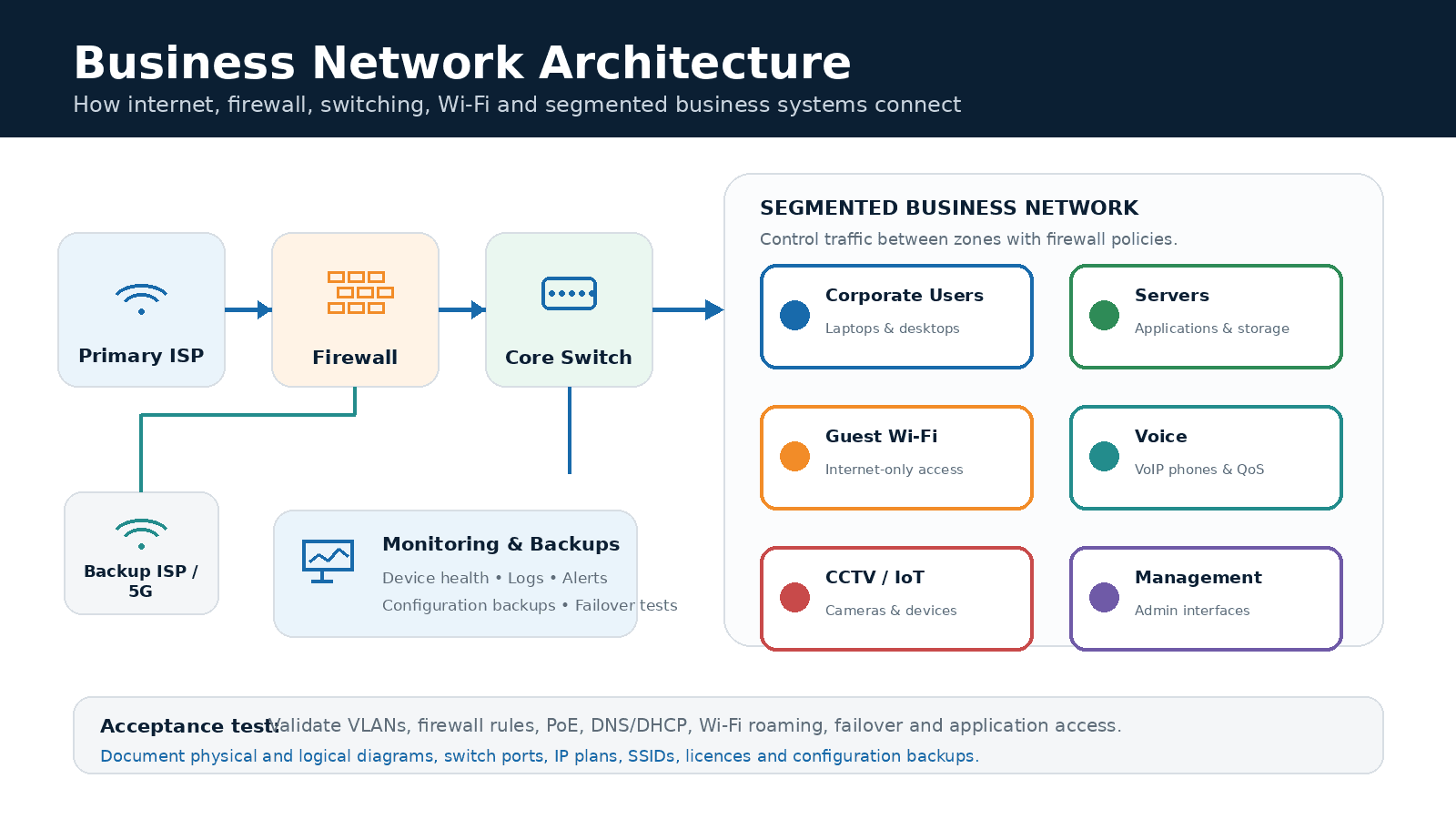
Network segmentation groups by trust and business function; firewall policies control communication between those groups of devices․ If possible‚ segregate corporate users‚ servers‚ guests‚ voice‚ printers‚ CCTV‚ access control‚ IoT and management traffic․ Document subnets‚ DHCP scopes‚ DNS‚ gateways‚ routing‚ firewall rules and ownership․ VLANs are not secure unless traffic between them is controlled․
Step 8: Apply A Security And Management Baseline
Each of these network segments should have controlled administration‚ patching‚ logging‚ configuration backups‚ and management access․ Best practices include: changing default administrative credentials‚ using named admin accounts‚ enabling multi-factor authentication where possible‚ configuring logging‚ turning off unused services‚ restricting management interfaces‚ and performing firmware updates․ Network security should be deployed in concert with endpoint security‚ identity protection‚ monitoring‚ and incident response capabilities․
Network Acceptance Testing Checklist
Pre-handover testing should be conducted on switch ports‚ PoE‚ uplinks‚ VLANs‚ DNS‚ DHCP‚ routing‚ firewall rules‚ VPN‚ logging‚ configuration backups‚ internet failover‚ Wi-Fi coverage‚ roaming‚ authentication‚ guest isolation‚ VoIP‚ CCTV‚ access to the cloud‚ printing and business applications․ Measure baseline latencies‚ packet loss‚ bandwidth‚ device health and channel utilization (or saturation)․
Documentation and Handover Requirements
Good documentation allows another skilled engineer to operate and restore the environment without starting from scratch․ Handover should include physical and logical diagrams‚ rack elevation‚ cabling schedule‚ switch-port mapping‚ VLAN/IP plan‚ firewall rules‚ SSIDs‚ licences‚ warranties‚ support contacts‚ ISP information‚ escalation contacts‚ and configuration backups․
Common Mistakes In Setting Up A Network Infrastructure
Ordering gear up front‚ choosing ports by number‚ sizing firewalls by headline throughput‚ mapping Wi-Fi to floor area‚ deploying a flat network‚ ignoring Power over Ethernet budgets‚ failing to test failover and neglecting to document or pass product ownership to support after deployment are all common pitfalls․
How Americana Computers Can Help
Americana Computers helps organizations in the UAE design‚ implement‚ secure‚ and support network infrastructure on switches‚ firewalls‚ Wi-Fi‚ structured cabling‚ internet connectivity‚ and monitoring․ Americana Computer Systems is a systems integration partner for UAE network infrastructure and offers discovery‚ design‚ cabling‚ firewalls‚ switches‚ wireless‚ testing‚ documentation‚ monitoring‚ support‚ and AMC services․ For example‚ according to Americana Computers: "A reliable network is designed around applications‚ users‚ security zones‚ and failure scenarios - not around a list of devices․"
Conclusion
Switches‚ firewalls‚ Wi-Fi‚ cabling‚ internet‚ security‚ and monitoring must integrate with each other as one operational system․ UAE businesses should assess requirements, validate location, design the segmentation, test the resilience, document configurations, and assign clear monitoring and support ownership before considering the network complete.
Frequently Asked Questions
1. What is included in a network infrastructure setup?
It includes internet, firewall, switches, Wi-Fi, cabling, VLANs, IP services, monitoring, documentation, and support.
2. How do switches, firewalls, and Wi-Fi work together?
Switches connect devices, the firewall secures traffic, and Wi-Fi extends controlled access to wireless users and devices.
3. How do I choose the right network switch for an office?
Choose based on port count, PoE budget, uplinks, VLANs, management, resilience, and future growth.
4. How should a business firewall be sized?
Size it based on inspected traffic, users, VPN load, security services, logging, and future bandwidth needs.
5. How many Wi-Fi access points does an office need?
The number depends on site survey results, device density, interference, coverage, roaming, and application demand.
6. Why is a Wi-Fi site survey important?
It confirms signal behavior, interference, capacity needs, access-point placement, and real-world coverage.
7. Should staff, guest, CCTV, IoT, and VoIP traffic use separate VLANs?
Yes, segmentation improves security, performance, troubleshooting, and access control.
8. Does a business need two internet connections?
Businesses with low downtime tolerance or heavy cloud dependency should consider backup internet or a failover.
9. What should be tested before accepting a new network?
Test connectivity, VLANs, firewall rules, failover, Wi-Fi, applications, VoIP, monitoring, and backups.
10. What network documentation should the IT provider deliver?
They should provide diagrams, IP/VLAN plans, firewall rules, switch maps, cabling records, licences, warranties, and support contacts.

Tehreem Fazal is a creative strategist, content marketer, and freelance writer with over six years of experience crafting impactful stories for local and international brands. She specializes in content strategy, brand storytelling, and SEO-driven writing across industries like fashion, real estate, food, digital marketing, lifestyle, and automotive etc. Her words have shaped the voice of leading names including Master Group, LUMS, Metropolitan Properties UAE, and more. With a background in English Literature, Tehreem blends creativity with strategy to make every piece of content resonate and convert. When she's not writing, she's exploring new ideas, brands, and narratives that inspire.

VPN vs Zero Trust for UAE SMEs: Secure Access Guide
Compare VPN and Zero Trust for UAE SMEs. Learn when to retain VPN, adopt ZTNA, and strengthen remote access with identity and device controls.
Read More
Multi-Branch IT Support UAE: Operations Guide
Learn how UAE multi-branch businesses can standardize IT support, secure connectivity, monitor systems, define SLAs and scale operations.
Read More